Frequently Asked Questions (FAQ)
If you have any questions while using Miiverse, this is the first place to check for an answer.
I saw a post or comment that violates the Miiverse Code of Conduct. What should I do?
If you encounter a post or comment that violates the Miiverse Code of Conduct, please report the violation using the Miiverse reporting function.
Reported violations will be reviewed by a Project Rosé moderator. Any post that violates the Miiverse Code of Conduct will be removed.
Please note: false reporting is a violation of the Miiverse Code of Conduct and is subject to action up to and including loss of Miiverse access.
I received a comment or message that is offensive, threatening, or upsetting.
Harassment of any kind, including slander, defamation of another user, disclosure of personal information, or invasion of privacy, is a violation of the Miiverse Code of Conduct. Even in messages between friends, such exchanges violate the Miiverse Code of Conduct.
Please report any posts or messages that violate the Miiverse Code of Conduct. If you are experiencing harassment, please use the Report function on the offending user’s profile screen.
Furthermore, if you do not want to receive comments or friend requests from a particular user, you may use the Block function on the user’s profile screen.
I saw a comment with a spoiler in it, even though it wasn’t marked as having spoilers.
It’s up to users to mark their posts as having spoilers. However, if someone forgets to do this, you can help by reporting spoilers.
Comments and posts that receive enough spoiler reports will be marked as spoilers, viewable only to people who have chosen to keep spoilers visible.
Why do some users have a green check mark? What are verified users? Can I be a verified user?
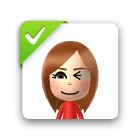
A verified user is someone whose identity has been authenticated and certified by Project Rosé. Their verified status indicates that they are a legitimate source of high-quality information. Their status as a verified user is indicated on their Mii character as shown here.
Verified-user status is granted only to parties when necessary as determined by Project Rosé. We do not accept requests for verification from the general public.
I can’t see comments for other regions.
Your Miiverse settings may not permit you to see posts made in other languages.
In Miiverse Settings, find the option that reads “View community posts from users who are using which system language?” to control which languages you see in Miiverse communities.
You may choose to view all languages (default) or only posts made by users with the same system-language setting as you.
Roséverse is not working on my Wii U console. I get Error 121-6172
On a linked Wii U console:
- From the Wii U Menu, tap the Mii character in the top-left corner.
- Next, select "Save Password", once its done, restart the console.
- If this does not work, make sure Aroma is updated to the latest version, and same for Inkay (Roséverse)
I accidentally deleted my Roséverse keys in the SD Card. I get Error 121-6174
You must sign in to Miiverse with your Pretendo Network ID and user password to be able to re-download the user key, if you are unable to login or have not set a user password, please contact a staff member in our Discord server available at projectrose.cafe
Are there any Project Rosé's Miiverse features that are available on Wii U consoles and systems in the Nintendo 3DS family but not available on PCs, smartphones, or other devices?
Features not currently available in the web version include:
- Handwritten posts
- The sending and receiving of friend requests
- Changing information about your own group chats
- Blocking and unblocking of users
How do I delete a Miiverse post?
If you post something you later do not want other users to see, you can delete it. Here is how:
- Select the post you wish to delete from within Miiverse. If you need assistance locating the post:
From within Miiverse, select your user icon, and then select Posts on the User Page.
- Scroll through the list of posts.
- Select the wrench icon located in the lower-right corner of the post you want to delete.
- Select the drop-down menu, and select Delete.
- Select Submit.
Please note that deleting a post does not ensure complete or comprehensive removal of the content or information posted by you (for example, if another user has copied your post or if you or another user previously shared the post on another website).
I found content that infringes on my copyrighted work, and I would like it removed.
Project Rosé respects the intellectual property of others, and we ask owners of Nintendo products and services to do the same. If you feel that your intellectual-property rights have been infringed, please visit projectrose.cafe, join our Discord server, and talk to us to submit a takedown request.